Release 4.14.0
08-18-2026 07:23jsreport 4.14.0 is here, bringing another round of improvements to our Office recipes.
I'll highlight the main improvements since the previous release post.
html-to-xlsx improvements
We promised to bring more attention back to the html-to-xlsx recipe, and that's exactly what we've been doing. One of the most requested features was support for images. It's now available and as simple as this:
<table>
  <tr>
    <td><img src="{{asset "image.png" "dataURI"}}" /></td>
  </tr>
</table>
We've also implemented several other features from our backlog, including support for indentation and print properties. You can find the full list of supported attributes in the documentation.
<table data-sheet-page-orientation="landscape">
  <tr>
    <td>hello</td>
  </tr>
</table>
xlsx improvements
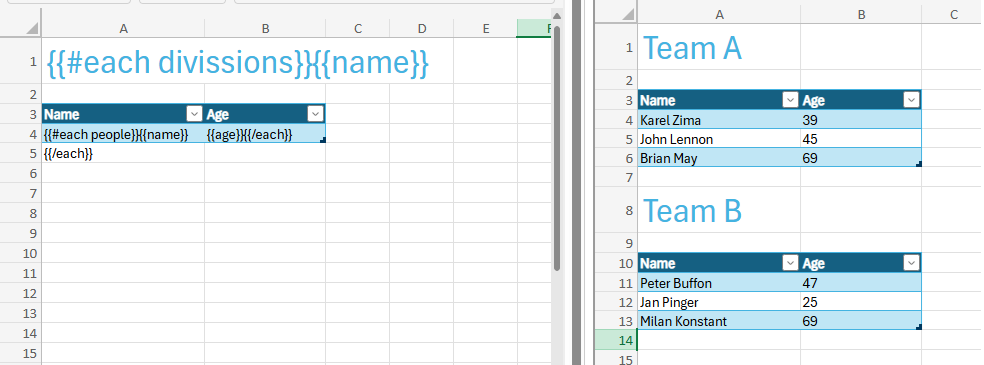
You can now render XLSX tables inside a #each loop using a simple and intuitive approach.
docx improvements
The docx recipe now supports adding images without the need for a placeholder. You can simply place the helper call directly in the document, and it will insert the image:
{{docxImage src=myDataURIForImage}}
You can also use an image loader helper function to dynamically fetch images from a custom source. See the documentation for more details.
pptx improvements
The pptxStyle helper can now target specific elements such as text, paragraph, shape, cell, and row.
This is particularly useful when you need to conditionally style a table, for example:
{{#pptxStyle textColor=myColor target='row'}}{{/pptxStyle}}
What's next
We're still busy improving the performance and feature set of our Office recipes. However, this work will soon be largely complete, allowing us to shift our focus to other things like AI integration.
We're also planning a major update to jsreportonline, so stay tuned.